

Using the Standard Metrics MCP with Claude in Excel
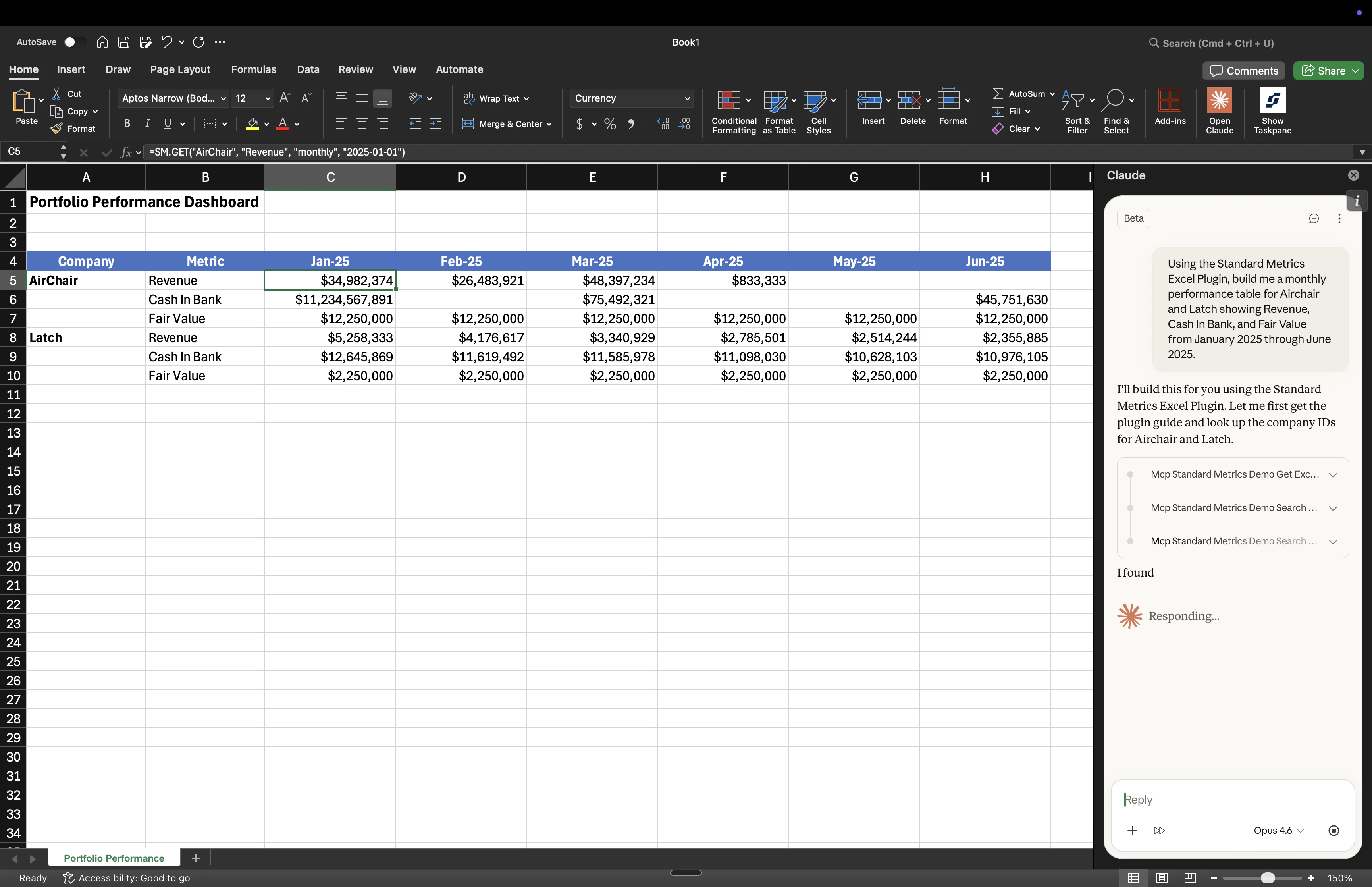
SM.GET formulas for pulling portfolio data directly in a spreadsheet.
Unlike static data exports, spreadsheets built with these formulas automatically refresh with the latest data every time you open or recalculate the workbook. Build a dashboard once, and it stays up to date as new data flows into Standard Metrics.
Prerequisites
Before you begin, you need three things set up:- Connect to the Standard Metrics MCP in Claude.
- i. Follow the Claude setup guide to connect the Standard Metrics MCP to Claude from your browser.
- ii. Log in with your Standard Metrics account.
- iii. The MCP provides Claude with a tool that teaches it the full syntax for the Excel plugin’s formulas, which is what allows Claude to build correct
SM.GETformulas on your behalf.
- Install the Claude Excel plugin.
- i. Install the Claude in Excel add-in from the Microsoft Office Add-ins store.
- Install the Standard Metrics Excel plugin.
- i. Install the Standard Metrics add-in from the Excel Add-ins store.
- ii. Open the add-in sidebar in Excel and log in with your Standard Metrics credentials.
- iii. You will need API credentials (client ID and client secret) from the Standard Metrics web app. See Initial Setup for how to generate these.
You must be logged into both the Standard Metrics MCP in Claude and the Standard Metrics Excel add-in in Excel with the same account for this workflow to function.
How It Works
When you ask Claude to build a spreadsheet using Standard Metrics data, the MCP provides Claude with a detailed guide for constructingSM.GET formulas. Claude uses your portfolio data from the MCP to write correct formulas with real company names and metric names, then places them directly into your Excel workbook.
SM.GETpulls a data point from Standard Metrics into a cell (read). Available to all firms.
Example: Building a Portfolio Dashboard with SM.GET
SM.GET is the formula for pulling data. It takes a company name, metric, time period, and date, and returns a live value.
Sample prompt
Try asking Claude something like this:Using the Standard Metrics Excel plugin, build me a monthly performance table for my Healthcare portcos showing Revenue, Cash In Bank, and Fair Value from January 2025 through June 2025.Claude will use the MCP to look up your actual company names and available metrics to build a live spreadsheet.